Fishing guide
PokeMMO Fishing Automation Guide
Fishing automation is useful when a supported route is built around rod usage and encounter handoff. This guide explains the high-level loop without overstating what fishing support does.
1. Free trial setup video
Start here if you are new to PokeBotLabs. This video shows how to create an account, download the Windows client and activate the 4-hour free trial from the desktop app.
2. PokeBotLabs Smart Route Recorder Tool Guide
How do you record your own route?
Use the PokeBotLabs Smart Route Recorder Tool to capture a custom farming path in PokeMMO, then load that route in Payday Machine. Watch this guide before recording your first route.
3. Windows display settings
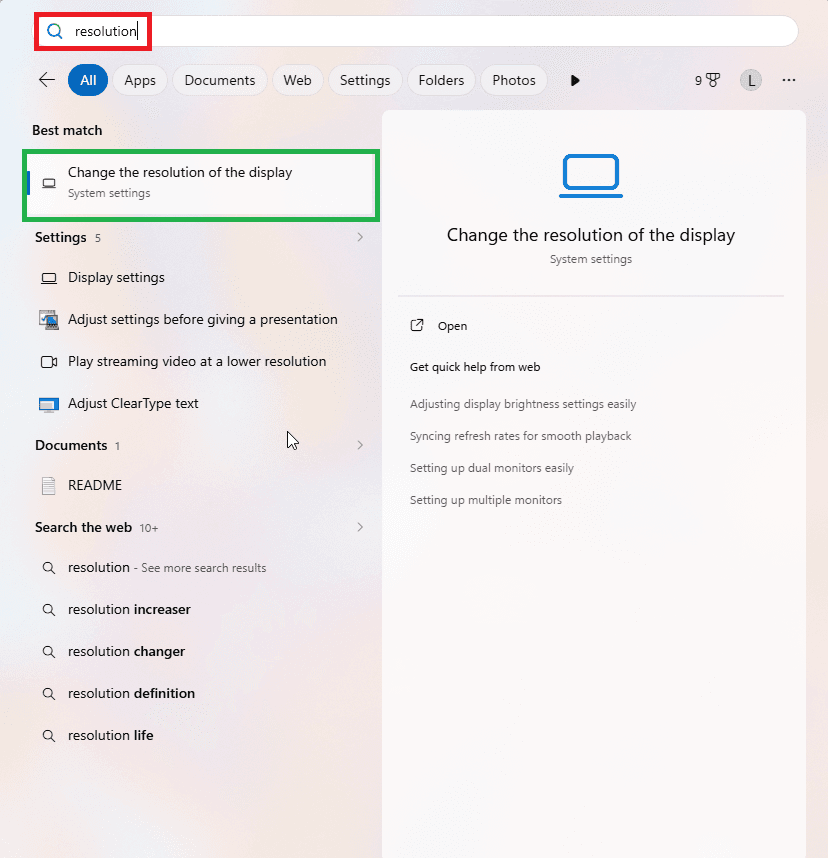
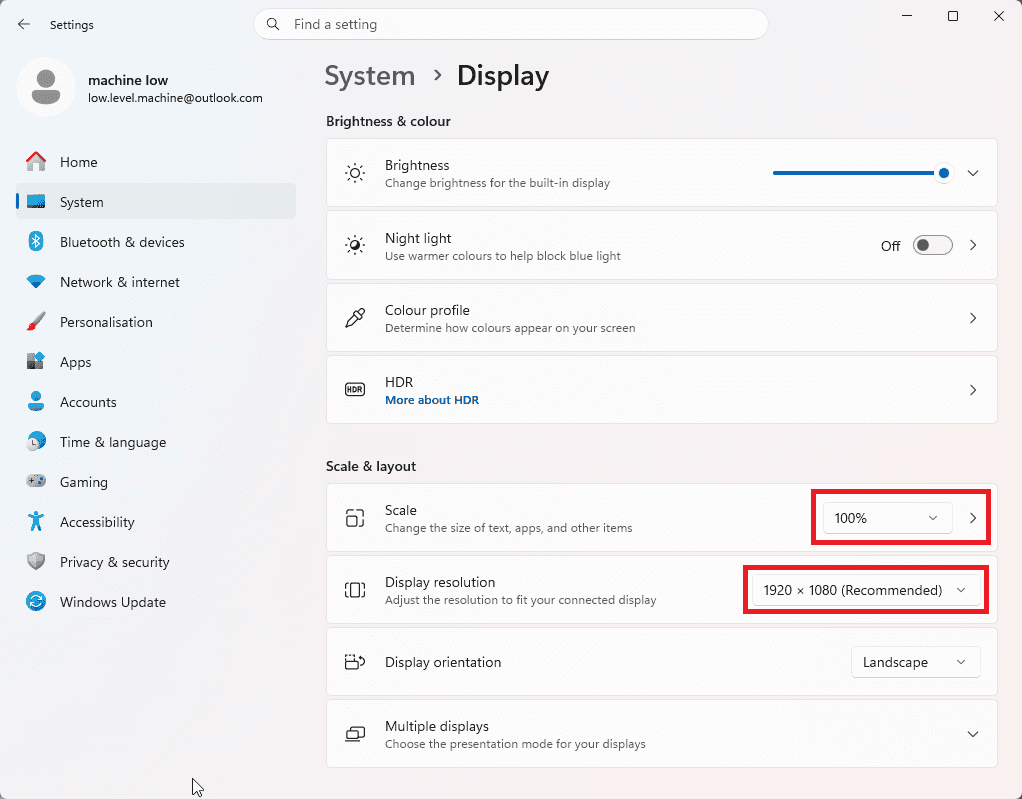
Before selecting the game window, set Windows display scaling and resolution to the expected layout. PokeBotLabs reads fixed screen regions from the PokeMMO client, so mismatched scaling or resolution can shift UI elements and make visual checks less reliable.
- Open the Windows Start menu and type resolution.
- Click Change the resolution of the display.
- Set Scale to 100%.
- Set Display resolution to 1920 x 1080.
- After changing display settings, restart PokeMMO before selecting the game window in the bot.
What a fishing route is
Fishing is a route method, not a standalone PokeBotLabs product. A fishing route uses rod input and dialog confirmation to create encounters, then hands the battle to the configured farming workflow such as Payday Machine where supported.
- Grass routes use configured movement through grass.
- Surf routes use supported water movement.
- Fishing routes use the rod, dialog state and encounter handoff.
- Use only maps that expose supported fishing route data in the client.
Preparing the route
- Select Fishing mode only when the selected map has fishing route data.
- Stand at the route's expected starting position before starting.
- Keep the Battle chat tab visible so battle and result events can be read.
- Do not change game layout, window selection or input bindings after validation.
Rod and input configuration
The fishing rod key comes from the saved dynamic input bindings. The bot should use the configured key instead of assuming one fixed key for every user.
- Set the fishing rod key in the client key settings.
- Set the action and back buttons to match your PokeMMO controls.
- Keep mount, movement, pause and stop bindings aligned with the game.
- If rod usage or dialog confirmation looks wrong, check bindings before changing route data.
The fishing loop
- Press the configured fishing rod key.
- Wait for the dialog confirmation state.
- Confirm the dialog through the supported mouse flow.
- Watch for a battle transition shortly after the dialog closes.
- Hand the encounter to the configured battle workflow if detected.
- Finish the battle, handle recovery or alerts if needed, then repeat.
When fishing retries
If the dialog closes and no encounter transition appears in the short confirmation window, the fishing loop can retry. This keeps the route moving without assuming every rod use creates a battle.
Fishing with Payday Machine
When configured for Payday Machine, fishing encounters feed into the normal Payday battle flow. The bot still needs the correct Payday Pokemon, PP planning, recovery route and catcher setup before the session starts.
- Payday PP and recovery rules still apply.
- Multi-Payday setups can extend runtime between recovery cycles.
- Fishing route efficiency depends on bite rate, battle speed, recovery travel and interruptions.
- Fishing support does not replace the normal setup and route requirements.
Shiny, CAPTCHA and special alerts
- If a supported Shiny encounter appears while fishing, normal farming should be interrupted and Shiny handling can take over.
- Keep the dedicated catcher Pokemon in party slot 6 before starting the route.
- If Horde-style handling is possible on a selected workflow, prepare a suitable non-catcher Pokemon with a reliable single-target damaging move.
- PokeBotLabs does not solve CAPTCHAs; it should pause and alert you so you can solve the CAPTCHA manually.
- Legendary or important encounter alerts are manual alerts, not guaranteed automatic captures.
Pokecenter recovery and logs
Fishing routes can still require recovery when PP or party state reaches the configured threshold. If recovery, battle state or route resume does not behave as expected, stop the session and keep the latest session log for support.
Troubleshooting fishing routes
- Rod is not used: verify the fishing rod key in the dynamic input settings.
- Dialog or bite is not detected: confirm the game layout and Battle chat state were not changed.
- Encounter transition is missed: stop and save the session log so support can inspect the exact state chain.
- Battle flow stops: check for menus, move prompts, CAPTCHA, Shiny handling or recovery conditions.
- Route does not resume: confirm the selected map has fishing route data and the starting position is correct.
- Movement mismatch: verify route type and saved movement bindings.
- Recovery does not start: confirm the route includes supported Pokecenter recovery.
- Shiny issue: confirm party slot 6 catcher and horde-preparation moves before long sessions.
Related pages
Review Payday Machine, the Payday farming guide, the farming hub, Shiny detection and the setup guide before running longer fishing sessions.
Use supported fishing routes
Fishing automation depends on route data and correct hotkey configuration. Review the setup guide before testing a new route.