PokeMMO Bot Setup & User Guide
A practical setup reference for installing PokeBotLabs, preparing the PokeMMO client, selecting the game window and sending useful support logs.
1. Free trial setup video
Start here if you are new to PokeBotLabs. This video shows how to create an account, download the Windows client and activate the 4-hour free trial from the desktop app.
2. PokeBotLabs Smart Route Recorder Tool Guide
How do you record your own route?
Use the PokeBotLabs Smart Route Recorder Tool to capture a custom farming path in PokeMMO, then load that route in Payday Machine. Watch this guide before recording your first route.
3. Windows display settings
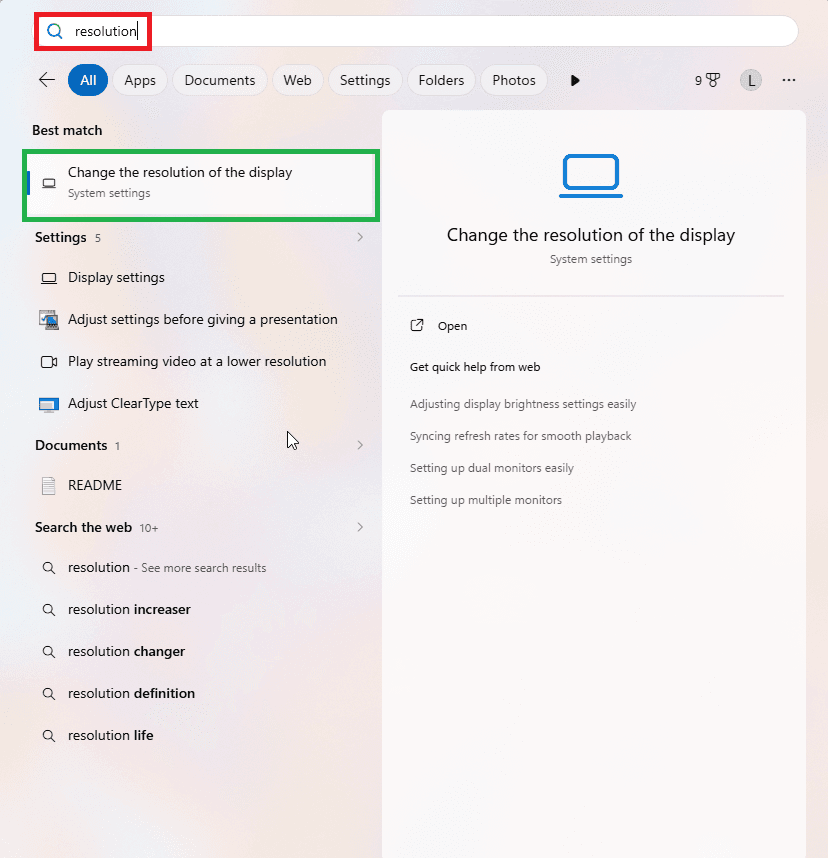
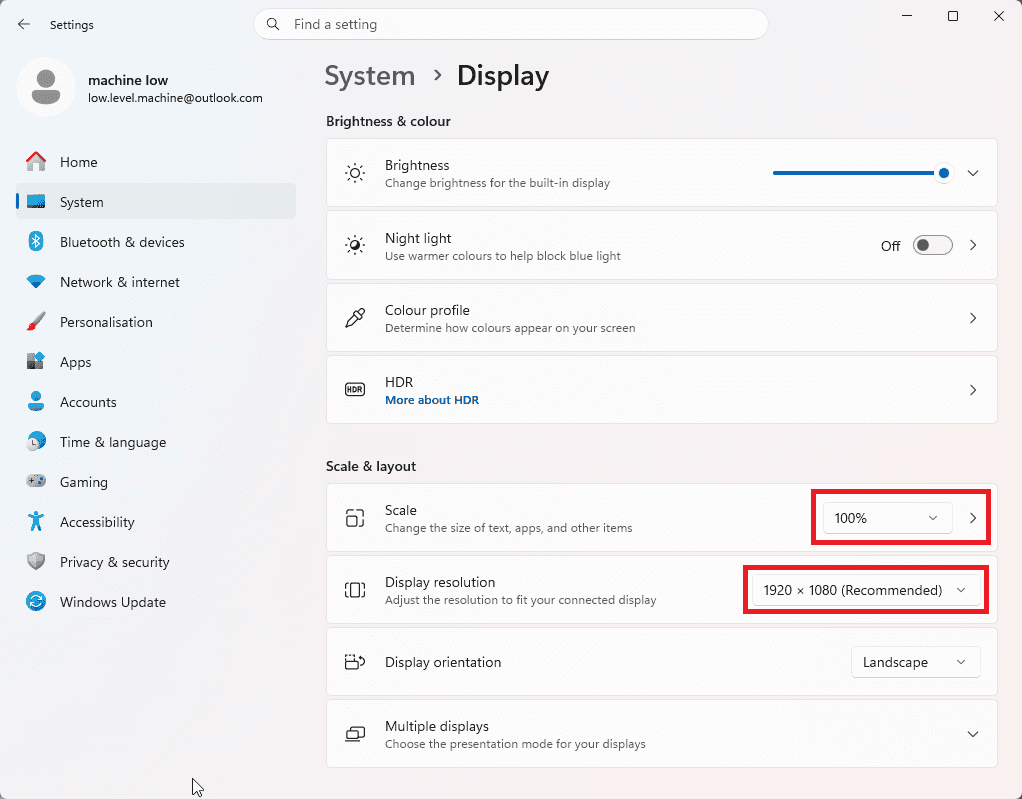
Before selecting the game window, set Windows display scaling and resolution to the expected layout. PokeBotLabs reads fixed screen regions from the PokeMMO client, so mismatched scaling or resolution can shift UI elements and make visual checks less reliable.
- Open the Windows Start menu and type resolution.
- Click Change the resolution of the display.
- Set Scale to 100%.
- Set Display resolution to 1920 x 1080.
- After changing display settings, restart PokeMMO before selecting the game window in the bot.
Account and download
- 1Create a PokeBotLabs account and log in.
- 2Open the dashboard and check the Download PokeBotLabs card.
- 3Download is available when the account has an active license, active trial or available trial entitlement.
- 4The trial timer starts from the Windows client when the device is verified.
Product and farming mode selection
- 1Payday Machine, EXP | Shiny Machine and Ditto Catcher are current public farming products.
- 2EXP | Shiny Machine is available for eligible accounts through the dashboard download flow.
- 3Fishing is a supported route method, not a separate product.
- 4Select a supported map and route type for the product you are actually running.
Install and launch
- 1Use Windows 10/11 x64.
- 2Extract the downloaded ZIP before launching.
- 3Run the launcher/client from the extracted folder.
- 4Allow the client to prepare its protected runtime before the main bot window opens.
Game setup
- 1Let the bot apply the required PokeMMO client settings when prompted.
- 2Restart the game if the bot asks you to do so after settings are applied.
- 3Keep the Battle chat tab selected after logging back into the game so battle, EXP, move-learning and recovery events can be read.
- 4Do not change the required game layout after the bot validates the window.
Selecting the game
- 1Use the target selector from the bot and drag it onto the PokeMMO game window.
- 2If the wrong window is selected, the bot should reject it and ask you to select PokeMMO again.
- 3After the game window is accepted, configure the product-specific map, mode and hotkeys.
Hotkeys and input bindings
- 1Movement, action, stop, pause, fishing rod, bicycle/mount and recovery keys are configured through the current client key settings instead of one fixed universal hotkey layout.
- 2Set the keys before starting a run and save the configuration so the client can reuse it next time.
- 3Keep the PokeMMO in-game controls aligned with the keys selected in the bot.
- 4If movement or menu input looks wrong, compare the game controls with the saved bot bindings before changing routes.
Route selection
- 1Choose only supported routes that exist in the bot's route list.
- 2Grass, Surf and Fishing routes are different route types and should be selected according to the map and farming method.
- 3Using the wrong map or an unsupported route can break movement, recovery or farming state detection.
- 4Do not guess route names; use the route names exposed by the client.
Party, catcher and horde preparation
- 1Prepare your Payday or leveling party before starting the bot.
- 2Keep the dedicated catcher Pokemon in party slot 6 for supported Shiny handling.
- 3If Horde encounters can appear, a suitable non-catcher party Pokemon should have a reliable single-target damaging move to clear surrounding Horde Pokemon while preserving the Shiny.
- 4Horde and Shiny handling depend on route support, team setup and current battle state; no capture outcome is guaranteed.
Payday settings and multi-Payday
- 1Payday farming depends on the configured Payday Pokemon, remaining PP, selected route and recovery behavior.
- 2Multi-Payday setups can rotate through more than one Payday Pokemon before returning to recovery.
- 3Recovery should start when usable Payday PP is exhausted or when the selected flow requires healing.
- 4The catcher and horde-preparation Pokemon should be planned around the Payday slots you intend to use.
Shiny, legendary and CAPTCHA handling
- 1EXP | Shiny Machine can use dedicated Shiny Mode to repeat supported horde encounters and run from ordinary battles instead of farming EXP.
- 2NO MAP mode can use prepared Leppa Berries or Ether to restore Sweet Scent without traveling to a Pokecenter; the client stops if no usable item remains.
- 3When a supported Shiny encounter is detected, the normal objective is interrupted and the Shiny handling workflow can take over.
- 4Legendary or special encounter alerts are manual alerts; the bot does not guarantee or automatically complete legendary captures.
- 5PokeBotLabs does not solve CAPTCHAs. If a CAPTCHA appears, the bot pauses, releases active input and alerts you so you can solve it manually.
- 6After a CAPTCHA, continue only when the game is safe and the bot indicates it is ready to resume.
Pokecenter, fishing and live overlay
- 1Pokecenter recovery can leave the farming route, heal the party and return toward the selected route when configured.
- 2Fishing routes use the fishing rod, dialog confirmation and encounter handoff instead of grass or surf movement.
- 3The live overlay shows current status such as searching, routing, battle flow, recovery, Shiny handling and important alerts.
- 4If the overlay status does not match the game state for a long time, stop the bot and save the session log.
Support and logs
- 1If something behaves unexpectedly, stop the bot and keep the latest session log.
- 2Open a dashboard support ticket and upload the log file when possible.
- 3Include the map, product mode and what the bot was doing when the issue occurred.
Troubleshooting reference
The bot will not start
Confirm that you are logged in, the game window was selected with the target tool and the client accepted the required PokeMMO settings. If the bot asks for a game restart after applying settings, restart the game before selecting the window again.
The game cannot be selected
Use the target selector on the actual PokeMMO window. If the bot applied required settings and asks for a restart, fully restart PokeMMO before selecting the same game window again.
License or authentication fails
Check that you are using the correct website account and that the license or trial belongs to this device. If the message mentions HWID or entitlement, open a support ticket instead of repeatedly retrying.
Movement looks misaligned
Make sure the PokeMMO window and required layout have not changed after validation. Unexpected movement is often caused by changed game settings, wrong map selection or mismatched input bindings.
The selected route looks wrong
Stop the session and confirm the map, route type and starting position. A Surf, Grass or Fishing route should not be substituted with a different route just because the map name looks similar.
Battle flow stops
Keep the Battle chat visible and check whether a menu, move-learning prompt, CAPTCHA, Shiny handling state or recovery condition is waiting for attention.
Recovery does not start
Confirm that the selected route has a supported Pokecenter recovery path and that the party/PP condition actually requires recovery.
A CAPTCHA appears
Solve the CAPTCHA manually. The bot should not solve it for you; use the pause/continue flow only after the game is safe to continue.
A Shiny handling issue occurs
Check that your catcher is in party slot 6 and that Horde-capable routes have a suitable single-target damaging move prepared on a non-catcher Pokemon.
Support needs more detail
Attach session_log.txt when opening a ticket. Include the product, selected mode, map, whether fishing or route automation was active, and the last visible in-game state.
Join our Discord
Need help, updates, and community support? Join our Discord server.
Product-specific guides
After the basic setup is complete, read the guide for the workflow you plan to run.