Farming guide
PokeMMO Payday Farming Guide
Payday farming is one of the most consistent ways to generate PokeYen in PokeMMO. PokeBotLabs automates the repetitive loop with route navigation, battle-state detection, PP management, Pokecenter recovery and encounter handling for long farming sessions.
1. Free trial setup video
Start here if you are new to PokeBotLabs. This video shows how to create an account, download the Windows client and activate the 4-hour free trial from the desktop app.
2. Payday Bot guide video
After the trial setup video, watch this Payday Bot guide to understand the farming workflow before starting your first session.
3. PokeBotLabs Smart Route Recorder Tool Guide
How do you record your own route?
Use the PokeBotLabs Smart Route Recorder Tool to capture a custom farming path in PokeMMO, then load that route in Payday Machine. Watch this guide before recording your first route.
4. Windows display settings
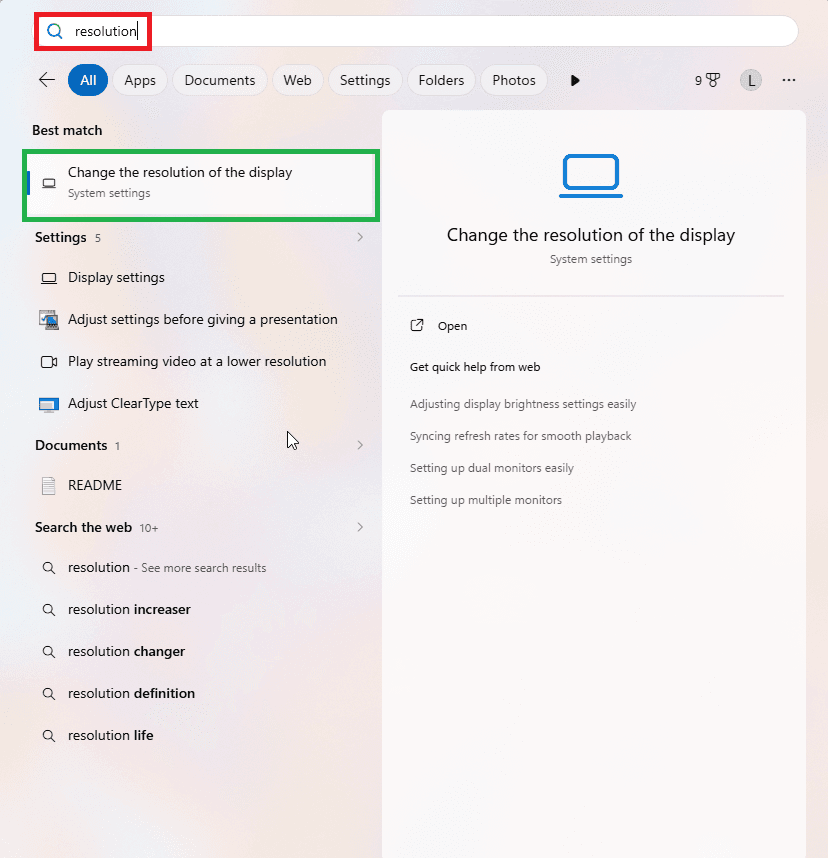
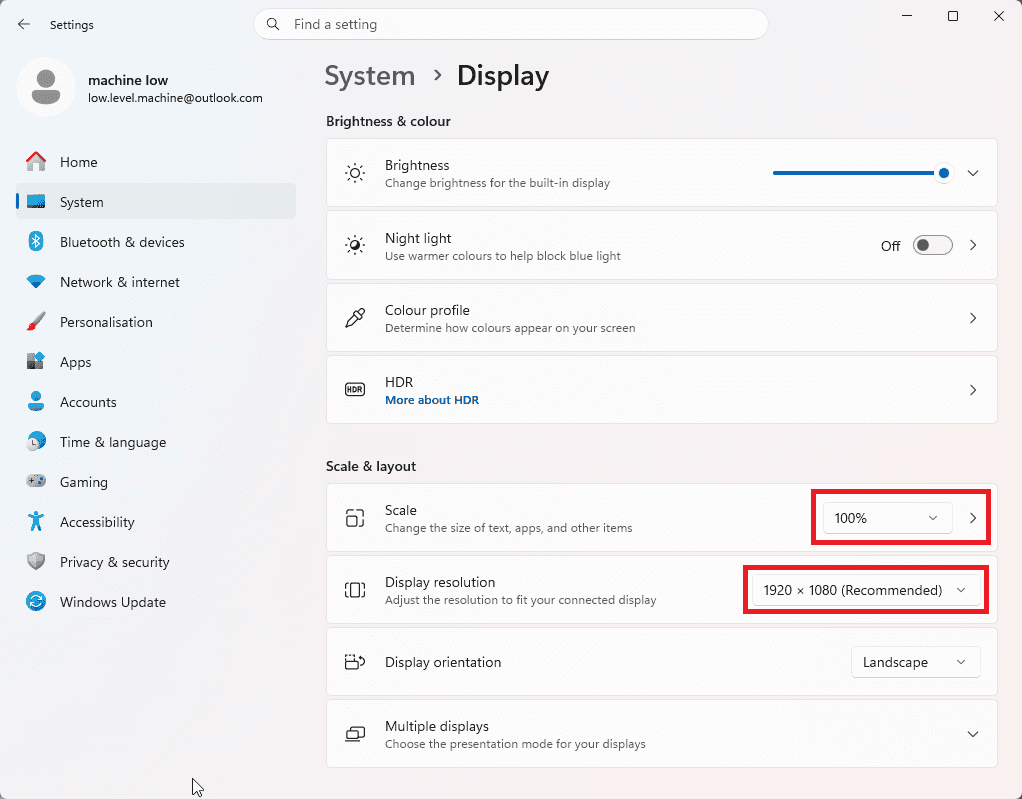
Before selecting the game window, set Windows display scaling and resolution to the expected layout. PokeBotLabs reads fixed screen regions from the PokeMMO client, so mismatched scaling or resolution can shift UI elements and make visual checks less reliable.
- Open the Windows Start menu and type resolution.
- Click Change the resolution of the display.
- Set Scale to 100%.
- Set Display resolution to 1920 x 1080.
- After changing display settings, restart PokeMMO before selecting the game window in the bot.
What Payday farming does
The basic idea is simple: repeatedly reach wild encounters, use Pay Day, finish the battle and continue farming until your Pokemon needs recovery. On suitable routes and with an optimized team, 2M+ PokeYen per day can be achievable, but it is not guaranteed. Actual income depends on route quality, runtime, team setup, encounter speed, interruptions and in-game conditions.
Instead of relying on a fixed timed macro, PokeBotLabs reacts to what is visible on the game screen and chooses the next action according to the detected state.
How the PokeMMO Payday farming loop works
- Navigate through the selected farming or fishing route.
- Detect when a wild encounter begins.
- Confirm the current battle state and safely reach the Fight menu.
- Use the configured Pay Day move.
- Confirm the battle outcome using visual detection and available game-state signals.
- Continue searching for the next encounter.
- Monitor remaining PP and recover at the Pokecenter when required.
- Return to the farming route and continue automatically.
Automatic shiny detection and catching
Long farming sessions create many encounters, which means a Shiny Pokemon can appear when you least expect it. PokeBotLabs includes Shiny encounter handling for supported farming modes.
When a Shiny Pokemon is detected, the normal farming flow is interrupted and the bot switches to its Shiny handling procedure. Depending on the encounter type, PokeBotLabs can preserve the Shiny, handle surrounding Pokemon during Horde encounters, switch to the configured catcher Pokemon and begin the capture process.
Recommended catcher setup
Keep your dedicated catcher Pokemon in party slot 6. This gives PokeBotLabs a predictable slot to use when a Shiny capture is required.
- Slots 1-5: Payday Pokemon, leveling Pokemon or supporting team members.
- Slot 6: Dedicated catcher Pokemon.
- If Horde encounters can occur, keep at least one reliable single-target damaging move available.
- Prepare your catcher before starting the bot instead of waiting until a Shiny appears.
Legendary encounter alerts and CAPTCHA handling
Certain rare or important encounters should not be treated like normal farming battles. When supported legendary or special encounter conditions are detected, PokeBotLabs can stop the normal farming workflow and play an alarm so you can handle the encounter manually.
PokeBotLabs does not attempt to solve CAPTCHAs automatically. If a CAPTCHA appears, the farming process is stopped and an alarm is played so you can return to the game and solve it manually before continuing.
Payday farming and EXP leveling at the same time
Your Payday party does not need to contain only high-level Payday Pokemon. You can place lower-level Pokemon in your party and allow them to gain EXP from battles while the Payday farming session continues.
- PokeYen farming can be combined with passive Pokemon leveling.
- Some routes may also support EV-training goals.
- EXP events, level-up screens, move-learning events and battle animations can slow down the route.
- A pure Payday setup usually gives better PokeYen per hour.
- A Payday + leveling setup gives lower PokeYen per hour but adds party EXP.
PP management and Pokecenter recovery
Payday farming depends on available PP. PokeBotLabs includes guard logic around battle menu and PP checks so it does not intentionally select the wrong action when the game state is not ready. When the farming flow requires recovery, configured healing behavior can take over.
- Stop the normal farming route when recovery is required.
- Travel to the configured Pokecenter.
- Heal the party and restore the farming team.
- Return toward the configured farming route.
- Resume Payday farming after recovery completes.
Multi-Payday farming
For players using multiple Payday Pokemon, PokeBotLabs can rotate through the available farming team instead of immediately returning to the Pokecenter after a single Pokemon runs out of usable PP. A properly configured multi-Payday team can extend active farming time between recovery cycles.
Route movement and potential earnings
PokeBotLabs supports configured farming routes designed around repeatable encounter areas. Instead of executing one identical movement pattern indefinitely, the route system can introduce movement variation while preserving the intended farming area and recovery flow.
A high-quality Payday route can improve encounter frequency, PokeYen per hour, recovery efficiency, travel time and farming consistency. The best results come from using supported routes designed for the selected farming mode.
Grass, Surf and Fishing Payday routes
Payday Machine can be used with different supported encounter methods depending on the selected map and available route data. These route types are not interchangeable, and the client should only use route names exposed by the supported route list.
- Grass routes use configured movement through grass encounter areas.
- Surf routes use supported water areas and route data designed for surfing.
- Fishing routes use rod input, dialog confirmation and encounter handoff; Fishing is a route method, not a separate product.
- Route types differ in encounter rate, travel time, recovery path and overall Payday efficiency.
Important setup rules
- Keep the Battle chat visible and do not change the expected chat layout during a run.
- Use the game configuration prepared during the PokeBotLabs setup process.
- Keep your catcher Pokemon in slot 6 and prepare it before farming.
- Prepare Horde-compatible moves if your farming route can create Horde encounters.
- Verify that client input bindings match your current game settings.
- Watch the setup and Payday demonstration videos before running long sessions.
Recommended first session
- Configure the game exactly as shown in the setup guide.
- Select a supported Payday route.
- Prepare your Payday Pokemon and catcher Pokemon.
- Verify your input bindings and keep the Battle chat tab visible.
- Start with a short farming session.
- Watch the PokeBotLabs overlay and logs.
- Confirm that encounters, battles and recovery behave correctly before starting longer sessions.
Troubleshooting
The bot is moving incorrectly
Verify that your configured movement keys match the game, the expected layout has not changed, the correct route is selected and Windows display/client settings match the setup guide.
The bot does not continue after a battle
Check that the expected Battle chat configuration is still visible and that important game interface settings were not changed during the session.
Payday PP is exhausted
Allow the configured recovery flow to take over. If recovery does not begin as expected, stop the session and review the session log before restarting.
Something unexpected happened
Create a support ticket from your PokeBotLabs dashboard and attach thesession_log.txt file from your bot folder. The log provides useful information about the states detected before the problem occurred.
Related PokeBotLabs guides
- PokeMMO Payday Bot: learn about the Payday Machine product, features and current availability.
- PokeMMO Farming Bot Comparison: compare Payday farming with EXP, leveling and fishing automation workflows.
- PokeMMO Bot Setup Guide: prepare Windows, the PokeMMO client, game settings and PokeBotLabs before your first session.
- PokeMMO Shiny Detection: learn how supported farming modes detect and handle Shiny encounters.
Start with the setup guide if this is your first run, then review the Payday Machine product page for current availability.
Start Payday Farming with PokeBotLabs
Payday Machine combines route navigation, battle handling, PP management, Pokecenter recovery, Shiny handling and farming-session monitoring in a single workflow. Create an account, follow the setup guide and use your available trial or license access to begin.